Is cold outreach dying, or are you doing it wrong?
A practical guide to what actually works in 2025: infrastructure, targeting, personalization, and multi-channel strategies that still get meetings.

Cold outreach isn’t dead. The lazy version is.
The old playbook (buy a list → blast 5,000 people per day → hope something sticks) used to barely work because inbox providers weren’t as strict and the market had less noise. Now Gmail and Outlook enforce stricter standards, buyers are skeptical of mass outreach, and everyone’s “AI-personalized” templates look identical.
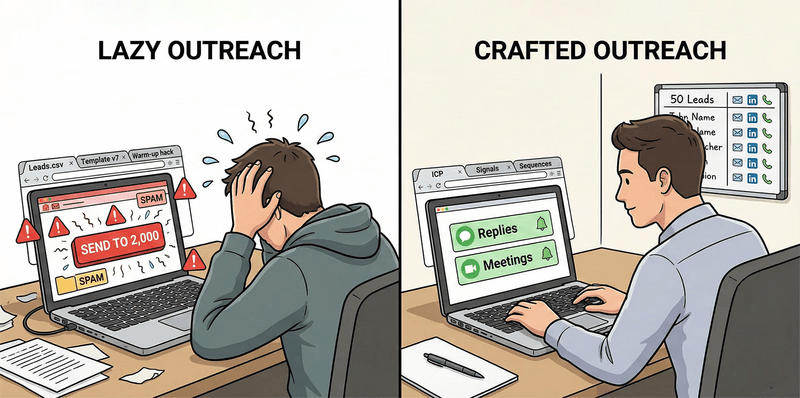
The lazy playbook is dead. The crafted, signal-driven playbook still works.
If your outbound numbers feel worse than they did in 2021-2023, you’re not imagining it. Average cold email open rates dropped to 27.7% and reply rates fell to 5.1% in 2025. That’s not “email is dead.” That’s “you can’t be sloppy anymore.”
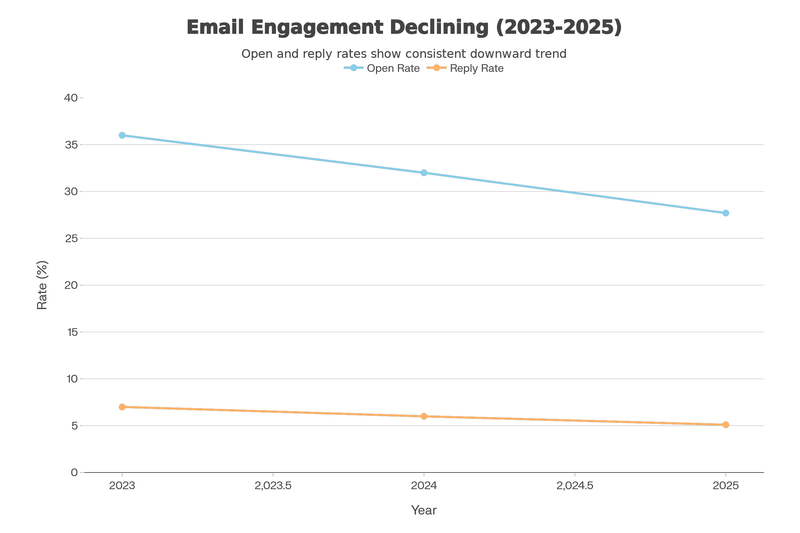
Engagement is down — not because outreach is dead, but because sloppy outreach gets filtered.
Here’s how to run outbound like a system instead of a lottery.
Cold outreach is multi-channel now
Most people think “cold outreach” = cold email. But the best results come from stacking channels.
- Cold email: scale and tracking
- Cold calling: fast qualification and objection handling in real-time
- LinkedIn DMs: higher response rates, fewer deliverability headaches
- Short personalized video (Loom/Vidyard): stands out fast; great after they’ve seen your name once
- SMS/WhatsApp (permission-based): high-visibility follow-ups (best after any opt-in or prior touch)
- Communities (Slack/Discord/Reddit): relationship-first conversations where your buyers already hang out
- Direct mail / gifting: a high-intent pattern interrupt for a small list of high-value accounts
I’ve personally run cold email, cold DMs (LinkedIn + X), and Loom-based outreach. I’ve also used Slack/WhatsApp communities (for talent sourcing), so treat the rest here as what I’m seeing work across teams, not me claiming mastery of every channel.
That being said, the key is that multi-channel beats single-channel by about 101% in engagement metrics. Email plus LinkedIn gets significantly more traction than email alone.
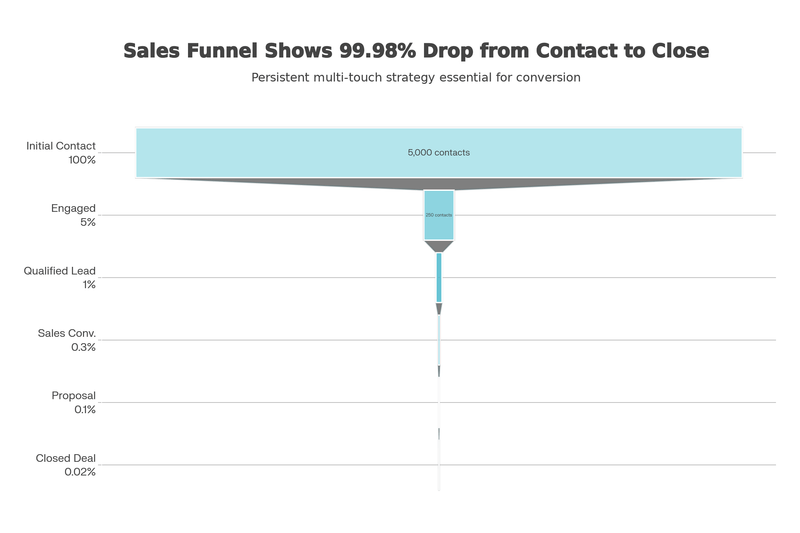
Stack channels: you’re building familiarity, not gambling on one inbox placement.
Running email-only in 2025 is leaving money on the table.
Cold email vs LinkedIn (what wins where)
Cold email
The metrics:
- Average open rate: 27.7% (down from 36% in 2023) (Source: Martal)
- Average reply rate: 5.1% (Source: Martal)
- Average conversion rate: 0.2% (roughly 1 deal per 500 emails sent) (Source: Martal)
- 95% of campaigns fail to generate replies (Source: Martal)
Why it works:
- Cheap, scalable, fully trackable
- Good for rapid positioning tests
Why most fail:
- Deliverability is now a technical discipline (authentication, reputation, list quality)
- Template-shaped emails get filtered or ignored instantly
LinkedIn DMs
The metrics:
- Average response rate: 10.3% (roughly double cold email reply rates) (Source: Expandi)
- Industry response rates: ~4.77% (Software/SaaS) to 10.42% (Legal/Professional services) (Source: Belkins)
- Multi-touch campaigns (DMs + profile actions) can push reply rates up to 11.87% (Source: Belkins)
- Connection request acceptance rate benchmark: ~30-45% for well-targeted requests (Source: LeadLoft)
Why it works:
- No spam folder to disappear into
- Built-in social proof (mutual connections, work history)
Where it fails:
- Volume limits prevent scaling
- Platform penalties kick in fast if you move like a bot
- Template DMs are becoming just as obvious and ignored
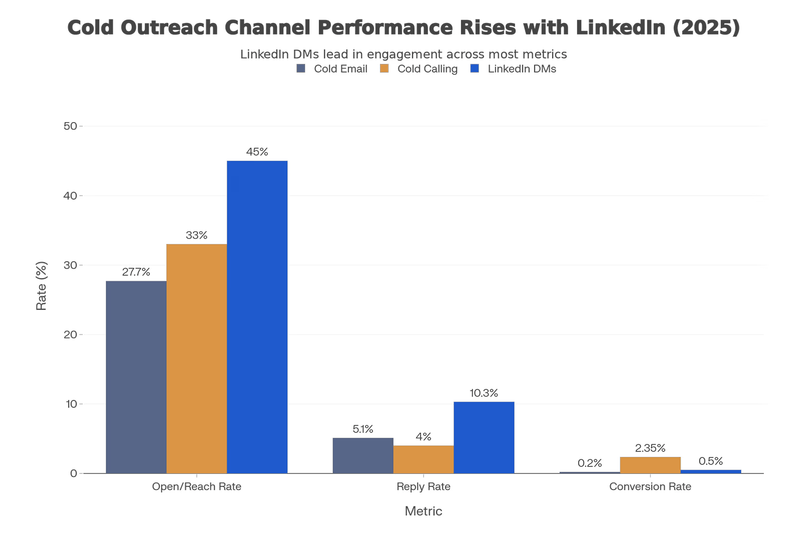
Different channels win at different parts of the funnel — use them for their strengths.
Why spray-and-pray fails now
The failure loop is always the same:
- Send generic mail to a bulk list
- Engagement tanks
- Mailbox providers recognize the pattern
- You get throttled, junked, or blocked
- Domain reputation dies
- You blame “cold email is dead”
It fails faster now for specific reasons:
- Gmail now enforces stricter bulk sender requirements (auth + alignment + unsubscribe)
- Google recommends keeping spam rate < 0.10% and avoiding ever hitting 0.30%
- Microsoft 365 uses SPF/DKIM/DMARC plus additional signals (composite authentication) to evaluate spoofing and delivery
You can’t tool your way out of this by adding more accounts or using more spintax. That just signals: “I’m a bulk sender-please block me.”
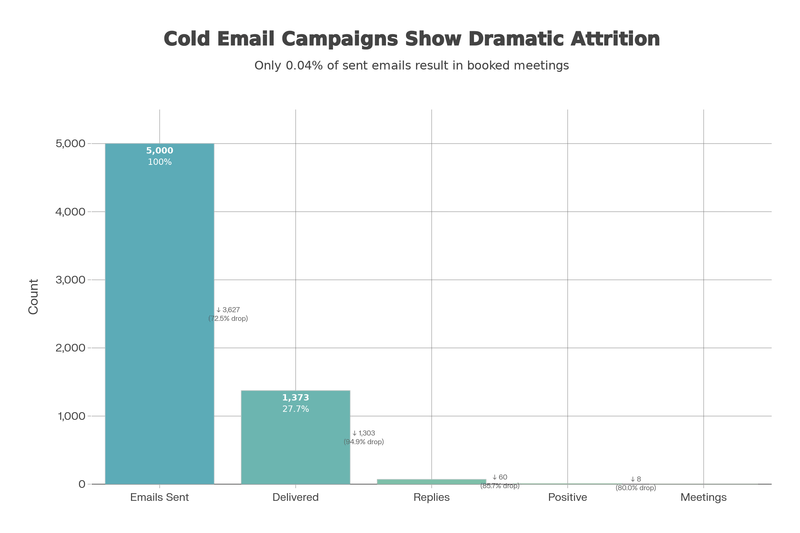
Most campaigns die before they ever reach a real conversation — the leakage is structural.
Infrastructure (the non-negotiables)
If you want cold email to work in 2025, infrastructure isn’t optional. Think of it like production reliability: you don’t get to “growth hack” your way around deliverability.
Authentication: SPF/DKIM are table stakes
Mailbox providers don’t just check that you have records. They check that what you send is consistent, aligned, and not getting reported as spam.
Minimum requirements:
- SPF + DKIM configured for the domain you’re sending from (and kept up to date as you add tools)
- DMARC set up for your sending domain (start with
p=none, then harden once reports look clean) - DMARC alignment: your From: domain must align with either the SPF domain or the DKIM domain
- DKIM key length: Gmail requires 1024-bit+; 2048-bit is recommended if your DNS supports it
- Monitor spam rate: aim to keep it below 0.10% and avoid ever hitting 0.30%
If this sounds like friction, that’s the point. Most competitors skip it, and you win by being boring and correct.
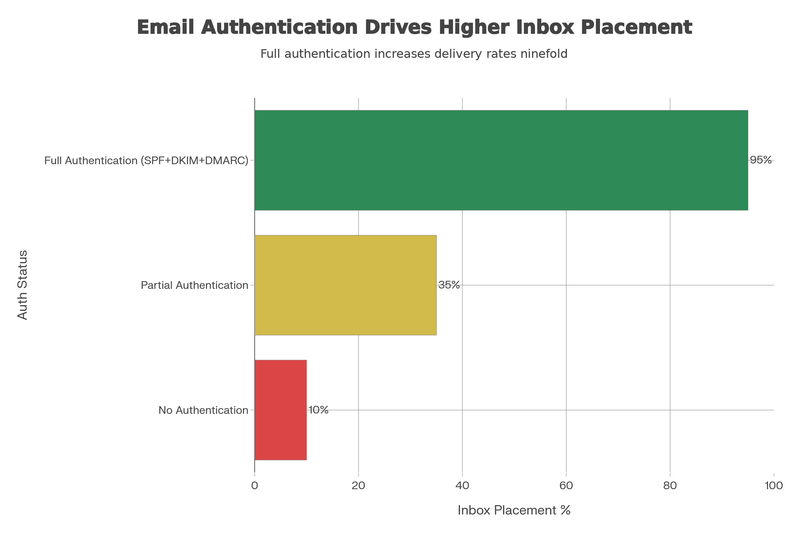
Authentication + alignment is table stakes now — if you fail it, you don't get to compete on copy.
Warm-up: it’s reputation shaping
The goal isn’t to “warm up inboxes” with fake threads. It’s to ramp real sending patterns gradually so providers see a stable sender.
Operator rules that actually help:
- Be careful with cheap/free warm-up networks. If you’re “warming” through spammy pools, you’re teaching providers the wrong signals and can damage deliverability.
- If you do use a warm-up tool, use a reputable deliverability-first network (I prefer MailReach, which is pricier but built around inbox placement + spam testing) (MailReach).
- The safest default for most people: skip warm-up. Start extremely small and ramp per mailbox, keep sending consistent, and monitor deliverability/spam indicators as you scale (Google sender guidelines).
- Avoid link-heavy, template-y blasts on brand-new domains (they look like bulk)
- Misconception: “Don’t use a signature or you’ll get blacklisted.” A signature is usually better for trust-just keep it plain (no images, no fancy HTML, minimal links) (signature.email).
- Use the same simple signature during warm-up that you’ll use in real campaigns, so your content/format doesn’t suddenly change when you start sending at scale.
- If deliverability is the priority, avoid open-tracking pixels and heavy click-tracking. Extra tracking elements often mean more HTML, more links, and more “marketing email” fingerprints-focus on replies/booked meetings as your primary metric.
List hygiene: lists decay fast
Email lists rot by about 28% annually. If you keep mailing stale data, you accumulate bounces and complaints.
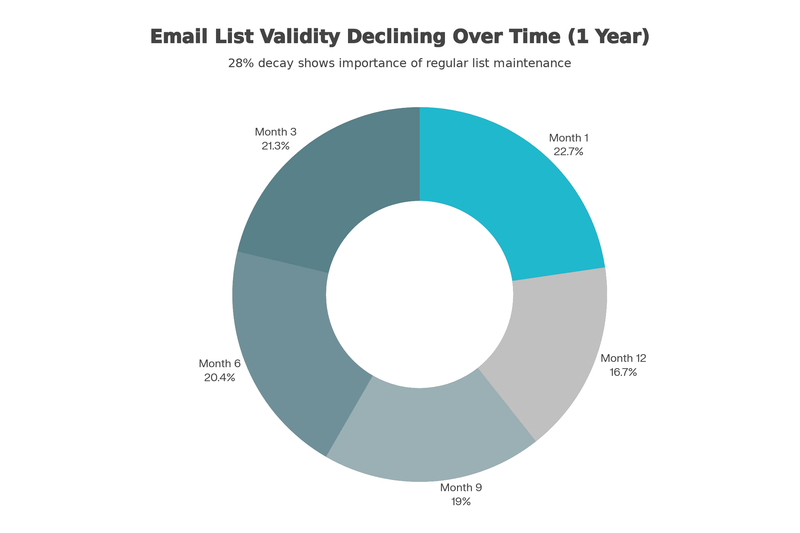
Lists decay continuously — treat validation and refresh like ongoing maintenance.
Basic hygiene:
- Validate email addresses before sending using a dedicated tool like Bulk Email Checker.
- Treat hard bounces + spam complaints as production incidents: pause, diagnose, fix the source
- Exclude obvious low-signal targets (role inboxes, generic aliases) unless you have a reason
- Refresh data continuously (quarterly is a minimum if you’re doing steady outbound)
Volume + cadence: avoid bulk-sender footprints
If you’re a bulk sender, Gmail has explicit requirements starting at 5,000+ messages/day to Gmail accounts (Google sender guidelines). But even below that, you can still get throttled if you send like a bot:
- Keep sending steady (no huge spikes, no “end of month” bursts)
- Spread volume across timezones and work hours
- Stop scaling on a domain the moment spam rate climbs toward 0.30% (Google sender guidelines)
Messaging: personalization isn’t what you think
Most outbound advice obsesses over copy. In reality:
- If you don’t land in the inbox, copy doesn’t matter
- If your targeting sucks, copy can’t fix it
- If your offer is unclear, nobody replies
Here’s what actually works now.
Personalization has tiers (merge tags don’t count)
{{FirstName}} and {{Company}} alone don’t cut it anymore.
Tier 1 (baseline): Firmographics in the message and subject line. Table stakes.
Tier 2 (better): Role-specific pain points + a recent trigger (job change, hiring, funding, new product, tech change). Example: "Noticed you hired a VP Sales at {{Company}}-that role usually struggles with rep ramp time in the first quarter."
Tier 3 (best, reserved for high-value accounts): Specific research. Reference a recent post, product launch, or funding announcement. Mention a mutual contact. Show you actually understand their situation.
Each tier takes more time. Use Tier 3 for strategic accounts, Tier 2 for mid-market, Tier 1 everywhere else.
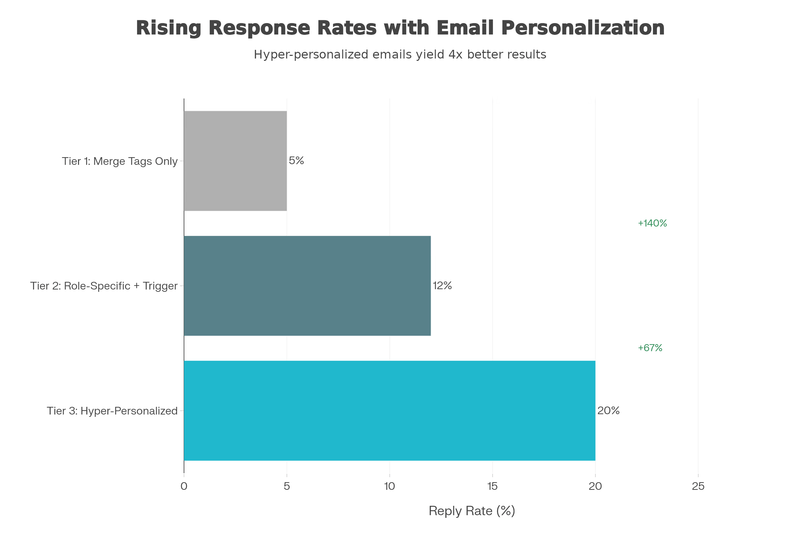
Personalization tiers: relevance beats clever phrasing.
AI personalization at scale: what works in 2025
AI doesn’t magically make outreach “personal.” It makes research + assembly cheap, so you can earn Tier 2 relevance at Tier 1 volume.
A practical workflow using tools like Clay:
- Enrich first, then write: build a list, waterfall enrich, and keep your CRM clean before you generate copy (Clay).
- Pull 1-2 real signals per account (not 10 facts): job changes, news mentions, tech stack, thought leadership, hiring. Clay’s “Signals” + AI research is built for this kind of trigger-driven outbound (Clay, Clay automate outbound).
- Generate snippets, not full emails: have AI produce three fields: reason now, proof, a single CTA. Then drop those into a human-written template so tone stays consistent.
- Human QA where it matters: Tier 3 accounts get a quick manual pass (facts, tone, intent). Tier 1/2 can run with lighter QA if your inputs are clean.
Done right, AI-driven personalization can materially move metrics. Teams use Clay to run iterative, trigger-driven outbound experiments at scale (e.g., Rippling’s case study).
If you want a low-cost solution to personalize cold emails with LinkedIn data, check out my post on scaling personalized outbound with AI.
In my own experiments, I’ve more than doubled reply rates on Instantly and seen ~3x higher LinkedIn connection acceptance using the same “enrich → pick 1-2 signals → generate snippets → QA” method (I just built it with a Python script instead of Clay). This approach was crucial for scaling Drool early on.
Buying signals beat clever copy
Intent matters more than adjectives.
Strong signals include:
- Pricing or demo page visits
- Repeated website visits in a short window
- Recent job changes (especially hiring managers)
- Funding announcements or expansion news
- Engagement with your content or competitor content
Timing is critical: Acting within 5 minutes of a buying signal increases conversion likelihood by roughly 9x. Even accounting for imprecision in that estimate, the principle holds: early outreach looks helpful, late outreach looks creepy.
Email length matters (but not how you think)
Long emails kill response rates. Shorter emails (75-125 words, roughly 120 words as a sweet spot) outperform newsletters.
Practical rules that keep you out of the “wall of text” penalty:
- Optimize for skim, not prose: 1-2 lines per paragraph, no giant blocks.
- One idea per email: one trigger, one problem, one proof point, one ask.
- One CTA: a single yes/no or a single choice (e.g., “Worth a 10-min chat next week?” or “Should I talk to you or
{{VPName}}?”). - Fewer links is safer: links can be useful, but early touches should read clean even with zero clicks.
Follow-ups: most people stop too early
About 80% of sales require 5+ touches, yet 50% of people stop after the first email. That’s not a motivation problem-it’s a sequencing problem.
What separates “persistent” from “spammy” is whether each touch adds new value:
- Rotate angles: different proof each time (customer example → relevant insight → quick teardown → short Loom).
- Use a clean cadence: space touches 48-96 hours apart, and don’t stack multiple pings in the same day.
- Keep follow-ups shorter than Email 1: often 1-3 sentences is enough.
- Include an out: “If this isn’t relevant, tell me and I’ll close the loop.”
- Have a stop rule: if you’ve sent ~5-7 touches across channels with no signal, pause and recycle them only when a new trigger appears.
A simple multi-channel sequence (10 days)
Here is an example sequence for a hypothetical business: NimbusOps, a SaaS that helps mid-market B2B companies automate vendor security questionnaires + SOC 2 evidence collection.
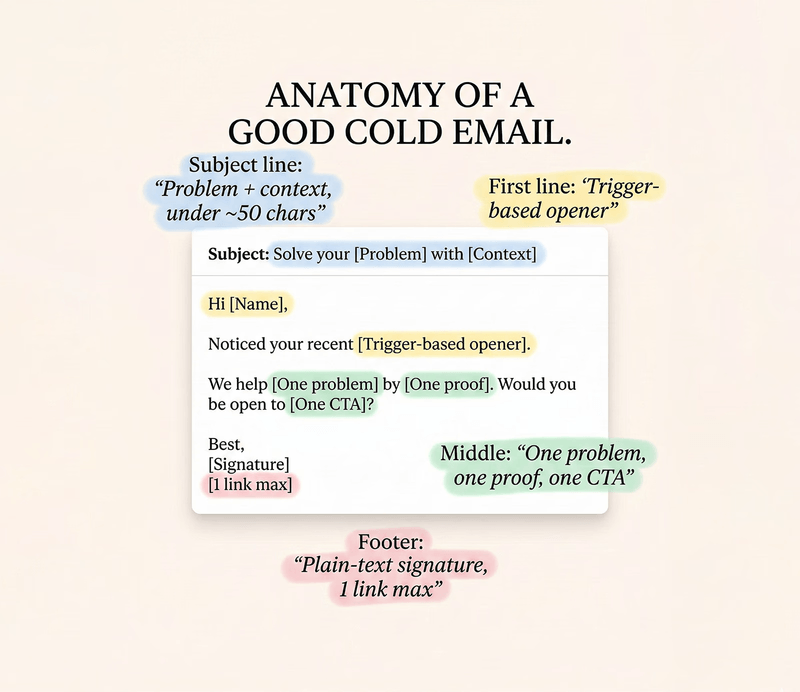
Anatomy of a good cold email: trigger → one problem → one proof → one CTA.
Day 1 - Email 1 (trigger + problem + specific ask)
Subject: quick question on vendor reviews at {{Company}}

Hi {{FirstName}} -

Noticed {{Company}} is {{Trigger}} (usually when vendor security reviews + SOC 2 evidence requests spike).

When teams handle questionnaires in docs + Slack, it tends to create 2 problems:
1) answers drift (different versions across deals), and
2) security/engineering becomes the bottleneck.

NimbusOps centralizes approved answers + evidence so sales can respond fast while security keeps control (audit trail + approvals).

Worth a quick look? If so, should I send a 90-second overview here, or is there someone else who owns vendor reviews at {{Company}}?

- {{YourName}}
Day 3 - LinkedIn connect (no pitch)
Connection note:
{{FirstName}} - saw you're leading {{TheirTeamOrFunction}} at {{Company}}. I work with security/eng teams on speeding up vendor reviews without losing control. Would love to connect.
Day 3 - LinkedIn DM (after they accept, still no pitch)
Thanks for connecting, {{FirstName}}. Question for you: when vendor questionnaires come in, is the bottleneck usually (a) finding the right, approved answers or (b) tracking evidence/ownership across security + engineering?Day 5 - Email 2 (new angle + proof)
Subject: are questionnaires slowing sales cycles at {{Company}}?

Hi {{FirstName}} -

Teams typically cut questionnaire response time by ~60% by keeping:
- one approved answer library (with owners), and
- evidence mapped to controls (so you're not hunting screenshots every deal).

If it's useful, I can send the exact 5-minute checklist we use to spot “questionnaire drag.” Should I send it now, or would Thursday work better?

- {{YourName}}
Day 7 - Value touch (teardown / short video instead of a call)
Subject: want a 45s teardown of where questionnaires get stuck at {{Company}}?

Hi {{FirstName}} - I recorded a 45-second teardown of where vendor questionnaires usually get stuck (and what to standardize first).

Option A (link): want the Loom? {{LoomLink}}
Option B (no link): I can paste the 3 bullets here - which do you prefer?

- {{YourName}}
Day 7 - LinkedIn DM version (if you’re connected)
I made a quick teardown specific to how teams like {{Company}} typically handle questionnaires. Want the 3 bullets here, or a 45s Loom?Day 10 - Final touch (close the loop)
Subject: should I send the 2 fixes to speed up vendor reviews at {{Company}}?

Hi {{FirstName}} - the two moves that usually speed up vendor reviews fastest are:
1) centralizing approved answers (with owners), and
2) mapping evidence to controls (so sales isn't chasing screenshots).

If that’s relevant at {{Company}}, reply with “1” (I’ll send the 90-sec overview) or “2” (I’ll send the 5-minute checklist).

- {{YourName}}
Track metrics that actually matter
Open rates are increasingly unreliable. Focus on what drives revenue and keeps you in the inbox.
Deliverability health:
- Bounce rate: keep hard bounces below 1-2%
- Spam complaints: aim for < 0.10% and avoid ever hitting 0.30% (Source: Google sender guidelines)
Pipeline metrics:
- Reply rate (track positive replies separately from auto-responses)
- Meetings booked
- Cost per qualified meeting
- Revenue per 1,000 emails sent
Segmentation metrics (this is where leverage lives):
- Which titles respond best
- Which industries convert
- Which triggers work
If you don’t segment, you don’t learn. If you don’t learn, you keep blasting and hoping.
Roadmap (do this in order)
Phase 1: Foundation
- Define ICP tightly (industry, company size, titles, specific pains)
- Set up SPF/DKIM/DMARC correctly
- Start a gradual ramp (with or without a warm-up tool-don’t rush)
- Write one solid sequence for a specific role (not 10 generic ones)
Phase 2: Testing
- Run a small pilot (100-200 leads)
- A/B test one variable at a time (subject line, opening, CTA)
- Track reply rate and positive replies; ignore vanity metrics
Phase 3: Refinement
- Add segmentation by role and trigger
- Add LinkedIn or calls to the sequence
- Keep list hygiene tight
Phase 4: Scale
- Scale only segments that proved they convert
- Add more domains/mailboxes only when reputation is stable
- Establish a weekly review loop (deliverability, messaging, targeting)
Bottom line
Cold outreach isn’t dead.
What’s dead:
- Treating volume like strategy
- Relying on fake personalization
- Ignoring deliverability until it breaks
- Running email-only and calling it “outbound”
If you treat cold outreach as a precision system - clean data, real targeting, solid infrastructure, multi-channel touches - it still works. Just not for free. And not for sloppy operators.
The difference between an okay campaign and a strong one isn’t luck. It’s discipline: on list quality, on targeting, on authentication, on testing, and on staying consistent when results don’t come immediately.
What’s next?
This is part of a series of posts on building a modern cold outreach system:
- What works in cold outreach — infrastructure, targeting, and multi-channel strategy
- Scaling personalization with AI — enriching leads and generating personalized copy for under $5 per 1,000 leads
- Finding and validating work emails — generating email patterns and validating them at scale for under $0.001 per email
- How to automate LinkedIn outreach — LinkedIn outreach automation using open-source tools
Coming soon:
I’ll show you how to build a 100% automated appointment booking pipeline, end-to-end:
- Automatically finding leads from LinkedIn, Reddit, and other sources
- Automatically sending emails + LinkedIn DMs as a complete outbound sequence to get appointments booked
All built with Python, open-source tools, and cheap “pay-per-result” services.