Honey, I Shrunk my Frontend Bundle Size!
How I replaced Lottie with Canvas sprites, migrated to Preact, and removed heavy dependencies to cut over 300KB from my bundle.

We love dropping big libraries on small problems. Need an animated icon? Install lottie-react. Need a toast? Install sonner. Need a hover effect? Install react-spring.
It works until you look at the bundle.
After adding rollup-plugin-visualizer, I found my sidebar icons alone were pulling ~200KB of JavaScript. React added another ~40KB. Time to trim.
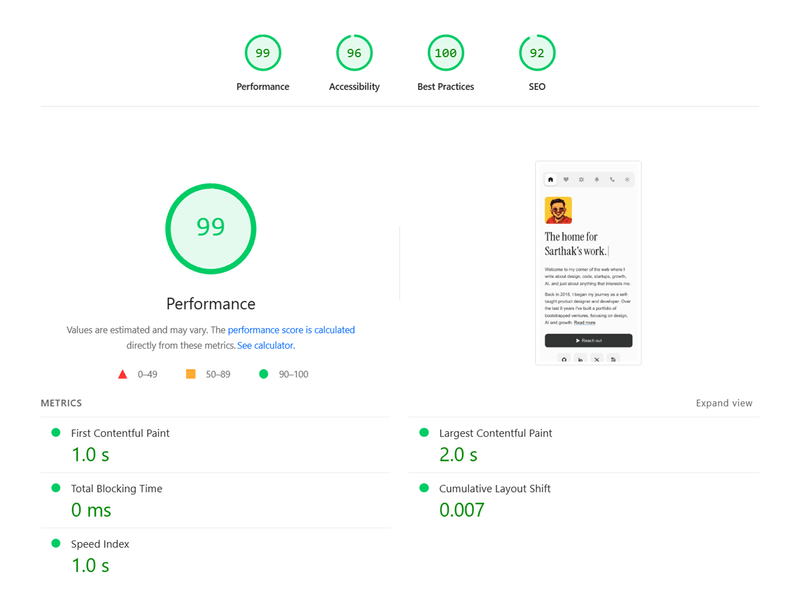
Lighthouse score after optimization
The Problem: Lottie was crushing performance
lottie-web plus its React wrapper were bundled just to animate five icons. That hit first paint, parse time, and memory. A 40-frame interaction does not need a full animation engine.
Solution: Canvas sprite sheets
I reused the sprite-sheet approach from my hero animation.
- Input: a 7x6 PNG (41 frames)
- Logic:
requestAnimationFrame+drawImage - Trigger: only runs when
isAnimatingis true (hover)
Result: ~3KB instead of ~210KB.
// SpriteIcon.tsx (simplified)
import { useEffect, useRef } from 'preact/hooks';

export default function SpriteIcon({ spriteName, isAnimating }) {
  const canvasRef = useRef<HTMLCanvasElement>(null);

  // Pure Canvas animation
  return <canvas ref={canvasRef} />;
}
Migration 1: React to Preact (~40KB saved)
For a content-heavy site, I do not need full React. Preact gives a near-identical API at ~3KB. I began with compat mode, then moved components to Preact primitives over time.
// astro.config.mjs
import preact from '@astrojs/preact';

export default defineConfig({
  integrations: [preact({ compat: true })],
  vite: {
    resolve: {
      alias: [
        { find: 'react-dom/server', replacement: 'preact-render-to-string' },
        {
          find: 'preact/compat/server',
          replacement: 'preact-render-to-string',
        },
      ],
    },
  },
});
Migration 2: Ditching react-spring (~20KB saved)
I was using react-spring for simple hover transitions. A physics engine for a 50px move is wasteful. Native CSS transitions with a custom cubic-bezier did the job.
Before:
const style = useSpring({ transform: `translateY(${position}px)` });After:
<div
  style={{
    transform: `translateY(${position}px)`,
    transition: 'transform 400ms cubic-bezier(0.20, 0.90, 0.20, 1.00)'
  }}
/>
Migration 3: Custom toast (~20KB saved)
sonner is great, but overkill here. I replaced it with ~120 lines of vanilla TypeScript that manipulates the DOM directly.
import { toast } from '@/lib/toast';
toast.error('Something went wrong');
Here’s the full implementation:
/**
 * Standalone toast notifications for use in Astro pages and scripts
 * This is a vanilla TS implementation that doesn't depend on React
 */

type ToastType = 'error' | 'warning' | 'success' | 'info';

const styleConfig = {
  error: {
    iconColor: '#DC2626',
    iconPath:
      '<path d="M13 7L7 13M7 7L13 13" stroke="white" stroke-width="2" stroke-linecap="round"/>',
  },
  warning: {
    iconColor: '#F59E0B',
    iconPath:
      '<path d="M10 6V10M10 13V13.01" stroke="white" stroke-width="2" stroke-linecap="round"/>',
  },
  success: {
    iconColor: '#16A34A',
    iconPath:
      '<path d="M6.5 10L9 12.5L14 7.5" stroke="white" stroke-width="2" stroke-linecap="round" stroke-linejoin="round"/>',
  },
  info: {
    iconColor: '#2563EB',
    iconPath:
      '<circle cx="10" cy="6" r="1.25" fill="white"/><path d="M10 9V14" stroke="white" stroke-width="2" stroke-linecap="round"/>',
  },
};

let toastContainer: HTMLDivElement | null = null;

function getToastContainer(): HTMLDivElement | null {
  if (typeof document === 'undefined') return null;

  if (!toastContainer || !document.body.contains(toastContainer)) {
    toastContainer = document.createElement('div');
    toastContainer.className = 'toast-container'; // Fixed positioning, top-right
    document.body.appendChild(toastContainer);
  }
  return toastContainer;
}

function createToast(type: ToastType, message: string): void {
  const container = getToastContainer();
  if (!container) return;

  const config = styleConfig[type];
  const wrapper = document.createElement('div');
  wrapper.className = 'toast-wrapper'; // Slide-in animation

  wrapper.innerHTML = `
    <div class="toast" role="alert">
      <svg width="20" height="20" viewBox="0 0 20 20">
        <rect width="20" height="20" rx="5" fill="${config.iconColor}"/>
        ${config.iconPath}
      </svg>
      <p>${message}</p>
      <button class="toast-close" aria-label="Close">×</button>
    </div>
  `;

  container.appendChild(wrapper);

  // Animate in
  requestAnimationFrame(() => {
    wrapper.classList.add('visible');
  });

  const removeToast = () => {
    wrapper.classList.remove('visible');
    setTimeout(() => wrapper.remove(), 200);
  };

  const closeBtn = wrapper.querySelector('.toast-close');
  closeBtn?.addEventListener('click', removeToast);

  // Auto-dismiss after 5 seconds
  setTimeout(removeToast, 5000);
}

export const toast = {
  error: (message: string) => createToast('error', message),
  warning: (message: string) => createToast('warning', message),
  success: (message: string) => createToast('success', message),
  info: (message: string) => createToast('info', message),
};
Same UX, zero dependencies, works outside the component tree.
Optimizing the critical path
PageSpeed showed 2,769ms max critical path latency. The main offenders: analytics and my pixelation effect loading too early.
1) Defer analytics
Load analytics in requestIdleCallback, fall back to load if unavailable.
<script is:inline>
  function loadAnalytics() {
    // append script...
  }

  if ('requestIdleCallback' in window) {
    requestIdleCallback(loadAnalytics, { timeout: 2000 });
  } else {
    window.addEventListener('load', loadAnalytics);
  }
</script>
2) Smarter pixelation
- Disable on mobile (performance over aesthetics)
- Batch reads/writes with
requestAnimationFrame - Use
offsetWidthwhen possible to leverage cached layout
The results
- Lottie removal: ~230KB saved
- React → Preact: ~40KB saved
- Spring + sonner: ~40KB saved
- Total: ~310KB (gzipped)
Critical path latency dropped from ~2.7s to non-blocking. The site feels snappier. Animations stay smooth on low-end devices because they are CSS-native or Canvas-based.
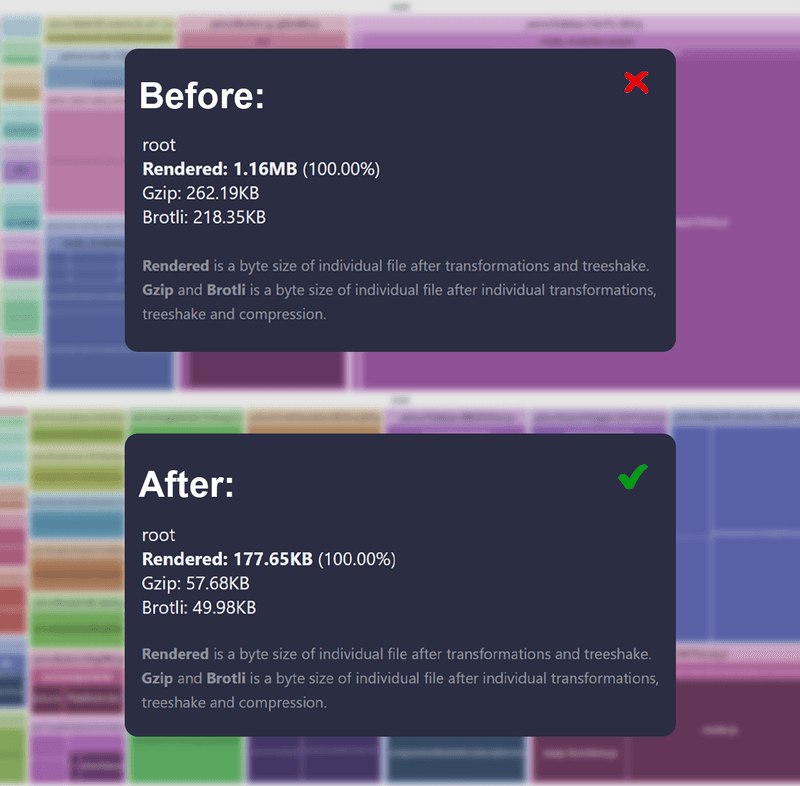
Bundle stats: before and after optimization
Takeaways
Dependencies are debt on every page load.
You do not need a physics engine for hover states. You do not need a full React runtime for a static blog. You do not need 200KB of JSON player logic to wiggle an icon.
Audit your bundle. The numbers will surprise you.