How to generate animated icons with TypeScript
How I replaced my Lordicon nav icons with seven animated sprite icons drawn in TypeScript, rendered with sharp, and played on a canvas.
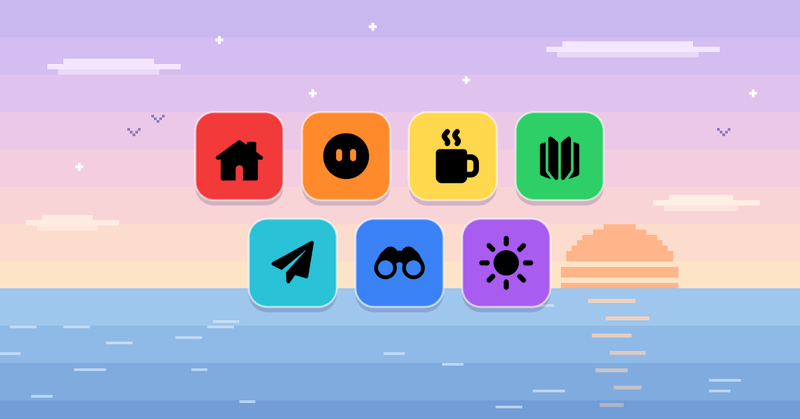
I recently redid the animated icons in my site’s sidebar. The old ones were Lordicon exports, and they looked like every other site using the same pack. A cog is also a strange icon for an About page.
The easy way would be to pick another icon pack. But a pack gives you someone else’s drawings and someone else’s motion, and the Lottie player that animated them was the biggest thing in my bundle. I wanted icons that were mine, animated on hover, and cheap enough to load on every page.
So I built a generator that draws every frame in TypeScript, renders them with sharp, and packs them into sprite sheets that a canvas plays on hover. I built it in a long back-and-forth with Claude Code, and almost all of my feedback was visual: too squishy, a flicker on the loop, a gray smear where smoke should be.
The Pipeline
The workflow looks like this:
- Drawing: One TypeScript module per icon writes each frame as an SVG string.
- Rendering: sharp renders each frame at 4×, shrinks it to 72px, and packs the frames into a sprite sheet.
- Playing: A canvas in the sidebar draws one frame at a time while you hover.
The final hover animations, enlarged. On the site they play at 24px.
Step 0: The rules for 24px icons
Icons that look great enlarged can fall apart at 24px. The sidebar only has 576 pixels to draw each frame, so every idea had to survive that.
What the sidebar actually has to work with.
The feedback rounds boiled down to four rules:
- Rigid motion only: Things move, turn, and tilt. They don’t squash, stretch, or morph. At 24px a squash looks like a glitch.
- Seamless loops: The animation repeats while you hover, so the last frame has to run straight into the first.
- No fades, no slivers: A half-transparent shape and a shape thinner than a pixel both turn into a gray smudge. Things appear and leave by growing and shrinking.
- Matching weight: All seven are solid shapes of roughly the same mass, so none of them looks heavier than the rest.
The third rule shaped more of the code than any other.
Step 1: Drawing each icon in code
Every icon module exports the same tiny interface: a frame rate and a function that returns the frames.
export interface IconSprite {
  fps: number;
  frames: () => Promise<Buffer[]>;
}
Inside, each frame is a function of u, which runs from 0 to 1 over the loop. Frame 0 doubles as the resting icon, so the icon at rest and the first frame of the hover can never disagree.
The icons took one of two routes. If a shape could be described with a handful of numbers, I wrote it as geometry. If it couldn’t, I started from a reference image and treated its pixels as data.
Home: Shapes as template strings
The house is three paths and a mask, written as a template string:
const frameSvg = (
  u: number,
) => `<svg xmlns="http://www.w3.org/2000/svg" width="${BIG}" height="${BIG}">
  <defs><mask id="door"><rect width="${BIG}" height="${BIG}" fill="#fff"/><path d="${door}" fill="#000"/></mask></defs>
  <g fill="#000">${smoke(u)}</g>
  <g mask="url(#door)" fill="#000" stroke="#000" stroke-width="${ROUND * SC}" stroke-linejoin="round">
    <path d="${chimney}"/><path d="${walls}"/><path d="${roof}"/>
  </g>
</svg>`;
Each shape gets a stroke in its own fill color with stroke-linejoin="round", which rounds every corner without writing a single arc. The door is a mask rather than white paint, so it stays transparent when the theme changes.
The smoke is where the fade rule bites. Three puffs start about a quarter-loop apart. Each one grows as it rises, then shrinks away, and anything under 1.4 units is skipped because it would only render as a speck.
const e = 1 - (1 - t) ** 1.6; // rises fast, slows near the top
const r = (2.2 + 2.6 * e) * (t < 0.78 ? 1 : 1 - (t - 0.78) / 0.22);
if (r < 1.4) continue; // no specks
About: Keyframe tracks and a fake sphere
The face glances down, then rises, tilts and winks. That’s five things changing at once: yaw, pitch, roll, a vertical rise, and how closed the right eye is. Each one is a keyframe track with cosine easing between the keys.
const inOut = (t: number) => 0.5 - 0.5 * Math.cos(Math.PI * t);

function track(keys: [number, number][], u: number) {
  if (u <= keys[0][0]) return keys[0][1];
  for (let k = 1; k < keys.length; k++) {
    const [u0, v0] = keys[k - 1];
    const [u1, v1] = keys[k];
    if (u <= u1) return v0 + (v1 - v0) * inOut((u - u0) / (u1 - u0));
  }
  return keys.at(-1)![1];
}
Every track starts and ends at 0, so the loop is seamless and frame 0 is the resting face.
To sell the head turning, the eyes ride an imaginary sphere slightly larger than the face. A glance moves each eye along the sphere and squeezes it by the cosine of its angle, the same foreshortening trick I used for the interactive avatar. The face itself never changes shape.
Blog: A loop that never resets
The book’s pages flip continuously from the right cover to the left. A naive version flips one page per loop and visibly resets, so I split the space between the covers into three slots instead.
Each loop moves every page exactly two slots, so the last frame is the first frame with the pages renamed.
const shift = (STEPS * f) / TOTAL; // slots moved so far this loop
for (let k = -STEPS - 1; k < SLOTS + 1; k++) {
  const phi = PHI_MIN + (k + shift) * SLOT;
  if (phi > PHI_MIN + 1e-3 && phi < Math.PI - PHI_MIN - 1e-3) phis.push(phi);
}
phis.sort((a, b) => Math.sin(a) - Math.sin(b)); // flatter pages are further back
The white gaps between pages broke the sliver rule. Near a cover, the gap became a thin wedge that flickered on and off at 24px. Now the gap shrinks to zero within about 25° of either cover, and the page merges into the cover until there’s room for a real gap.
Contact: Seven points and one late cut
For the paper plane, I read seven coordinates off a reference drawing and mapped them into icon space with a scale and an offset. A plane is a polygon, so seven points describe it completely.
The fold slit is where the house’s rounding trick backfired: the fat stroke filled the narrow slit back in. The fix was ordering. I draw the body closed and rounded, then cut the slit afterwards with a mask.
The motion is a pull-back, a push forward, one swoop, and a glide back to rest. A single envelope ramps from 0 to 1 and back, and every motion channel is multiplied by it, so 120 frames of busy motion still start and end on the resting plane.
const flying = (u: number) =>
  smoothstep(seg(u, 0.03, 0.18)) * (1 - smoothstep(seg(u, 0.82, 0.97)));
Work: Tracing a raster and faking a turntable
Some shapes are easier to draw than describe. For the mug, I generated a flat icon with an image model and treated the PNG as data. A flood fill labels its connected regions: the biggest is the mug, the ones above it are steam, and the part right of the handle’s hole is the handle.
With the body and handle separated, a 360° spin is just projection. The handle’s width is scaled by |cos θ|, and it’s drawn behind the body while sin θ is negative. No 3D model, and nothing squashes.
const hw = Math.round(handleW * Math.abs(c)); // c = cos(theta)
const behind = Math.sin(theta) < 0;
if (handleLayer && behind) layers.push(handleLayer);
layers.push(bodyLayer);
if (handleLayer && !behind) layers.push(handleLayer);
The binoculars took the same route: a reference drawing, cleaned up by the same region code.
Theme: A mask, not a morph
The theme toggle has to turn a sun into a moon. That sounds like a morph, which rule 1 forbids, but it’s actually a mask. The disc grows from radius 5 to 10 while a masking circle slides in and bites out the crescent.
The rays do fade here, the one exception to rule 3. This sprite doesn’t loop: hovering plays it once in under a second, so there’s no repeating loop to flicker. In dark mode, the same frames play backwards.
Step 2: Rendering the sprite sheets
A sprite sheet is a single PNG holding every frame of an animation in a grid. The browser downloads one image, and the canvas draws one cell at a time.
Every frame is drawn at 288×288, four times the frame size, and shrunk to 72. Drawing big and shrinking gives curves and diagonals soft, even edges. 72 is 24 × 3, so a 3× phone screen gets one sprite pixel per screen pixel.
export const FRAME = 72;
export const SC = 4;
export const BIG = FRAME * SC;

export async function svgFrame(svg: string): Promise<Buffer> {
  const big = await sharp(Buffer.from(svg)).png().toBuffer();
  return sharp(big).resize(FRAME, FRAME).png().toBuffer();
}
The entry script lays the frames out in rows of ten, writes the sheet and the resting still to public/icons/, and writes src/data/icon-sprites.json with each icon’s columns, rows, frame count and frame rate. Before writing, it checks that the frames actually animate, have smooth edges, and have a transparent background.
Step 3: Playing them with Canvas
Playing the sheets works the same way as the canvas in my pixel-art hero. On hover, a requestAnimationFrame loop advances the frame index at the icon’s frame rate and draws that cell:
const col = frame % config.cols;
const row = Math.floor(frame / config.cols);
ctx.drawImage(
  img,
  col * frameWidth,
  row * frameHeight,
  frameWidth,
  frameHeight,
  0,
  0,
  canvas.width,
  canvas.height,
);
The frames are black on transparent, and the canvas gets filter: var(--icon-filter), which is near-black in light mode and white in dark mode. That’s why the generator never picks a color.
The Result
The generator is about a thousand lines of TypeScript and rebuilds all seven icons in about three seconds. The seven sheets add up to about 450KB: the house is just 21KB, and the paper plane is the heaviest at 156KB for two seconds of 60fps motion.
There’s no animation library at runtime, just a <canvas>, and changing any motion is a matter of editing a number and rerunning the script.
It’s a lot of code for seven icons, but I’ll never have to settle for someone else’s cog again.